
Procrastination Timer: Study3.2.0 - Google Play
You'll be able to see results in few seconds.
Publisher Description
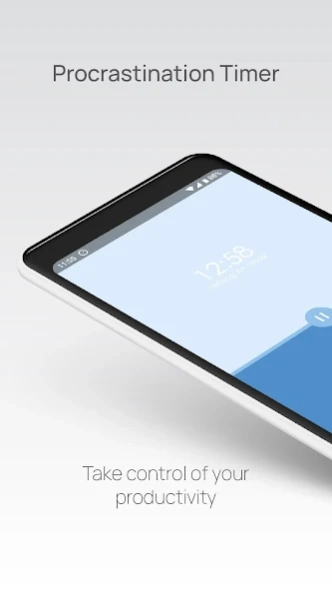

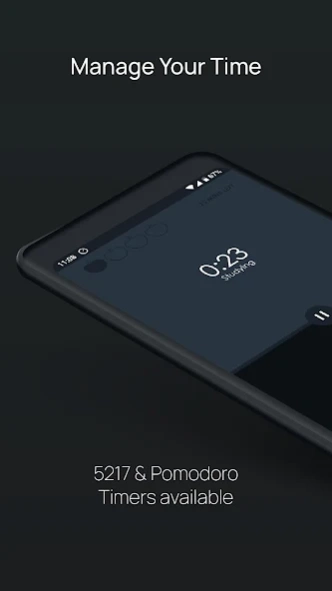

Study timer that also counts procrastinating. Focus stopwatch and Pomodoro timer
How long did you really study today? Procrastination Timer puts two stopwatches on one screen: one for studying, one for procrastinating. Tap the one you're doing. Both totals stay in view, so at the end of a session you know exactly where the time went. No ads, no account.
Made for students, and just as good for work, writing or practice: rename the two timers for any pair of activities you're juggling.
TWO TIMERS, ONE TAP
• Tap the top half when you start studying and the bottom half when you drift. Only one timer runs at a time; the other keeps its total.
• Both timers count up, so the whole session is visible at a glance.
• Timers keep counting while the app is closed or your screen is off.
• Pause, then reset when you're done. Reset by mistake? You have a few seconds to undo it.
SWITCH FROM YOUR NOTIFICATIONS
• The timer notification shows the running timer with Pause and Start buttons, so you can switch sides without opening the app.
• On recent Android versions it appears as a Live Update.
• Start either timer from the app icon's shortcuts, or play and pause from a Quick Settings tile.
POMODORO, 52/17 AND 112/26
• Turn on a method in Settings and a band across the middle fills as your block runs, with the minutes left underneath.
• Pomodoro: 25 minutes of work, a 5-minute break, and a 15-minute break after every fourth block. Four dots track your rounds.
• 52/17 and 112/26: longer work and break rhythms, taken from studies of highly productive workers.
• When a block ends, you get a notification and the other timer glows. Nothing switches on its own; you decide when to move on. Switching early asks for a second tap, so a stray touch never cuts a block short.
• Prefer no structure? Leave methods off and use the plain stopwatches.
MAKE IT YOURS
• Rename both timers: Writing and Scrolling, Work and Break, Practice and Rest.
• Light, dark, or match your phone's theme.
• Honors your reduced-motion setting and works with screen readers.
WHAT IT DOESN'T DO
Procrastination Timer keeps things simple. There's no history or statistics, no custom block lengths, no app blocking, no widgets and no sync. It's two honest timers.
A NOTE FROM THE MAKER
Hi, I'm Tomu. Procrastination Timer first came out in 2019, and I've rebuilt it from scratch. I make it on my own, with no ads and no tracking. I hope it helps you focus.
FREE, WITH NOTHING TO UNLOCK
Every feature is free. There are no ads, no account and no analytics, and your timers and settings stay on your phone. If the app helps you, there's an optional tip jar in Settings. It unlocks nothing.
Pomodoro and Pomodoro Technique are trademarks of Francesco Cirillo. Procrastination Timer isn't affiliated with or endorsed by him.
Website: https://tomuozawa.com/procrastination-timer/
Support: hello@tomuozawa.com
About Procrastination Timer: Study
The company that develops Procrastination Timer: Study is Tomu. The latest version released by its developer is 3.2.0.
To install Procrastination Timer: Study on your Android device, just click the green Continue To App button above to start the installation process. The app is listed on our website since 2026-10-11 and was downloaded 0 times. We have already checked if the download link is safe, however for your own protection we recommend that you scan the downloaded app with your antivirus. Your antivirus may detect the Procrastination Timer: Study as malware as malware if the download link to com.tomuozawa.procrastinationtimer is broken.
How to install Procrastination Timer: Study on your Android device:
- Click on the Continue To App button on our website. This will redirect you to Google Play.
- Once the Procrastination Timer: Study is shown in the Google Play listing of your Android device, you can start its download and installation. Tap on the Install button located below the search bar and to the right of the app icon.
- A pop-up window with the permissions required by Procrastination Timer: Study will be shown. Click on Accept to continue the process.
- Procrastination Timer: Study will be downloaded onto your device, displaying a progress. Once the download completes, the installation will start and you'll get a notification after the installation is finished.
Program Details
System requirements
Download information
Pricing
Version History
version 3.2.0
posted on 2026-10-11
Now in 13 more languages: German, Spanish, French, Italian, Dutch, Brazilian Portuguese, Japanese, Korean, Simplified and Traditional Chinese, Turkish, Indonesian and Vietnamese. Long-press the app icon to start either timer, or add the Quick Settings tile to play and pause from the shade. Block reminders have their own chime and skip the pop-up while the app is open. Screen readers now read the timers as hours, minutes and seconds.
version 2.8
posted on 2019-06-12
CHANGES
. Minor UI changes
FIXED
. Crash on devices Android Lollipop and lower
version 1.0
posted on 2016-12-31
• Now updates the "You are currently studying" text to the correct task in the notification
Disclaimer
Official Google Play Link
We do not host Procrastination Timer: Study on our servers. We did not scan it for viruses, adware, spyware or other type of malware. This app is hosted by Google and passed their terms and conditions to be listed there. We recommend caution when installing it.
The Google Play link for Procrastination Timer: Study is provided to you by apps112.com without any warranties, representations or guarantees of any kind, so access it at your own risk.
If you have questions regarding this particular app contact the publisher directly. For questions about the functionalities of apps112.com contact us.
